
HAVOC IT journal
“But it works.” Why we still migrated the infrastructure and email to Microsoft 365
Four workstations, five mailboxes and a migration shaped around the way people worked.
It was one of HAVOC IT's first projects and, at first glance, there was nothing urgent to fix. The four workstations were running, people were getting their work done, and the five email mailboxes hosted in cPanel were sending and receiving messages without any obvious problems.
Most of the company's work already took place in Outlook, Word and Excel, alongside PDF documents. From the users' perspective, things worked. We had no failed server, no unavailable service and no incident forcing us to intervene.
In other words, the system worked.
And that was where the project began. Infrastructure changes do not always have to wait until something breaks. Sometimes the question is not whether the system works today, but whether the way it is built still fits how the company wants to work tomorrow.
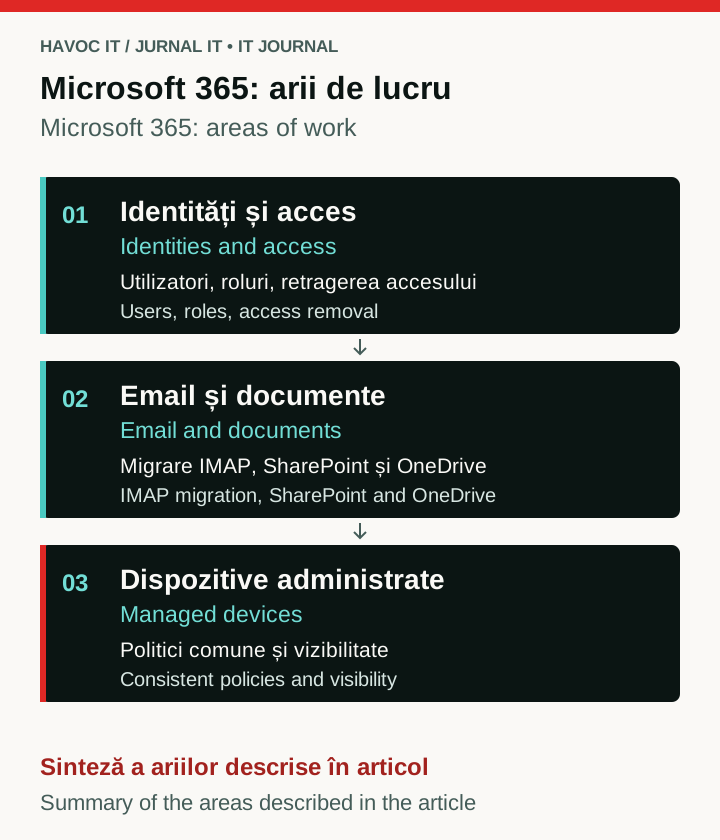 Open the full-size diagram (new tab)
Explanatory diagram of the three project areas: identities, email and documents, and devices. It is not a screenshot of the client’s environment.
What “it works” actually means
For someone using a computer every day, things were straightforward enough. They switched on their workstation, opened Outlook, sent emails, edited a spreadsheet, worked on a Word document and read the PDFs they needed. If all of that works, it is perfectly reasonable to think the infrastructure is fine.
From an IT management perspective, though, other questions arise. How do we manage user identities? How do we revoke access when someone leaves? How do we manage several workstations without working on each one manually? How do we apply shared policies, and what visibility do we have over the endpoints?
There was also the question of access to documents. If someone needed to work away from the office, we could build a conventional solution using a VPN to access local resources. Technically, that was entirely possible.
But before building a solution, it is sometimes worth asking whether the problem still needs to exist in that form.
Why Microsoft 365
We did not start from the assumption that cPanel is insecure or that every local infrastructure should move to the cloud. That would be too simplistic. cPanel can be managed properly, and Microsoft 365 can be configured very badly.
For this client, the advantage of Microsoft 365 was that several components previously managed separately could be brought into a common model. User identities could be managed through Microsoft Entra ID, devices through Intune, email could move to Exchange Online, and company documents could be organised in SharePoint.
The client had Microsoft 365 Business Premium licences, which also gave us Microsoft Defender for Business for endpoint protection. We did not need to buy a separate EDR platform for these few devices or build infrastructure that was disproportionately complex for the size of the company.
We were not trying to turn four computers into an enterprise environment.
We were simply trying to make four computers easier to manage.
Five mailboxes, and more than an MX change
Email was hosted in cPanel and consisted of five mailboxes. Moving to Exchange Online meant more than changing the MX record and waiting for new messages to arrive.
The existing mailboxes already contained the users' correspondence, which needed to be preserved. Messages and email folder structures were migrated to Exchange Online over IMAP so users could find their history after the move.
There is an important distinction here: an IMAP migration transfers messages and email folders, not a complete Exchange mailbox with calendars, contacts and tasks. In our case, it was the existing correspondence that needed to be preserved, so the method suited the project.
In parallel, we configured the domain's DNS for Microsoft 365. We changed the MX record so new messages would reach Exchange Online and configured Autodiscover so Outlook could automatically identify the appropriate Exchange service.
SPF, DKIM and DMARC
For users, we have documented practical checks before opening a suspicious message.
Alongside the email migration, we configured the domain's email authentication mechanisms: SPF, DKIM and DMARC.
SPF declares which infrastructure is authorised to send messages for a domain. In our case, Microsoft 365 needed to be recognised as one of the legitimate email sources.
For DKIM, we published the two CNAME records required by Microsoft 365, selector1 and selector2. One selector is used to sign messages at a given time, while having the second allows DKIM keys to be rotated without interrupting authentication.
DMARC completes the mechanism by checking alignment between the domain users see in the From field and the domains authenticated through SPF or DKIM. It also allows a policy to be defined for messages that claim to come from the domain but fail the required checks.
SPF, DKIM and DMARC do not make phishing impossible, nor do they stop someone from attempting to spoof the domain. Their role is to reduce the chances of the recipient's server accepting such a message as legitimate email sent on the company's behalf.
For users, all of this needed to remain almost invisible. After the migration, they needed to open Outlook and carry on working.
SharePoint instead of building access around a VPN
The document side was probably the change that fitted most naturally with how people already worked. Most of their activity took place in Outlook, Word and Excel, and around PDF documents.
One option would have been to keep the files on local infrastructure and configure external access through a VPN. Users would first connect to the company network, then access local resources through the existing authentication mechanisms, including NTLM where the infrastructure used it.
Technically, the solution would have worked.
But if someone mainly needs a spreadsheet, a Word document or a PDF, they do not necessarily need to connect to a VPN and then a local network just to reach the file. In this case, there was a simpler way to solve the problem.
We created a SharePoint structure for the company's documents, with access that could be tied directly to each user's Microsoft 365 identity. Documents could be accessed from a browser or the Office applications already used in day-to-day work, without a physical workstation in the office remaining the point through which every access had to pass.
That does not mean SharePoint is “better than a VPN”. They solve different problems.
If you have an ERP available only on the LAN, an internal application, a server that needs to remain on-premises or other local resources, a VPN may be exactly the right solution. But it made little sense to create a dependency on a VPN solely to access Office documents that could be managed directly in Microsoft 365.
Four computers can be managed centrally without making things complicated
On the endpoint side, we had four workstations. There was no need for dozens of policies or a model designed for thousands of devices.
The workstations were integrated into the Microsoft ecosystem, and Intune gave us a central mechanism for managing devices and applying the policies we needed. For endpoint security, we could use Microsoft Defender for Business, included in the client's Microsoft 365 Business Premium licence.
This meant protection could go beyond conventional antivirus. Defender for Business also offers endpoint detection and response capabilities, threat visibility and tools for identifying device vulnerabilities.
Our aim, however, was not to enable every feature simply because it was included in the licence. The advantage was having a central point from which to manage devices and a set of security tools we could adapt to the client's actual size.
If we needed to change a policy, check a device's status, revoke access or prepare a new workstation the next day, the mechanism was already in place.
Identity became the common link
One of the changes that was less visible to users, but important for administration, was that identity began to connect all these components.
The same user had an identity managed in Microsoft Entra ID, used their account for Microsoft 365, accessed email through Exchange Online and could be given access to documents in SharePoint. Their device could, in turn, be managed through Intune.
This does not mean Microsoft 365 automatically eliminates every security or administration problem. But it reduces the number of separate systems you need to keep track of and allows you to build more coherently around the user's identity.
For an environment with four workstations, that may seem like a small difference.
In day-to-day administration, though, small environments benefit particularly from not having to build a separate solution for every task.
“But it works” can be a very good argument
There is a temptation in IT to treat any older technology as a problem that needs fixing.
We disagree with that idea.
If a system works, can be managed securely and meets the organisation's requirements, the mere existence of something newer is not a sufficient reason to replace it.
“But it works” can be a very good argument.
It is just worth following it with another question:
Does it also work for what we want to do next?
For this client, the answer was only partly yes. Email worked, the workstations worked and documents were accessible. But the way people worked was better suited to infrastructure where identity, devices, email and documents could be managed more consistently together.
The choice was not between an “old and bad” system and a “new and good” one.
It was between two ways of organising the same work.
One of our first projects
The migration was not spectacular. It involved four workstations, five mailboxes, Microsoft 365 configuration, IMAP message migration, DNS changes, SPF, the two DKIM records, DMARC, Exchange Online, SharePoint, Intune and endpoint protection.
Much of the work was done in a few hours, over a coffee.
There was no failed server to bring back to life and no company unable to work until we finished. Instead, we had the advantage that things still worked and we could make the change without the pressure of an ongoing incident.
Perhaps that is precisely why the project deserves its place in the IT Journal.
One of the best times to change infrastructure is while it still works. You have time to check, migrate and test before a problem turns the same change into an emergency.
In this case, we started with four computers, five email addresses and the Word, Excel and PDF documents people needed for their everyday work.
We did not try to build anything more complicated than necessary.
We simply tried to choose infrastructure that better suited the way people already worked.
Published: