
HAVOC IT journal
Windows Server 2022 would not boot: almost 10 hours of recovery and 90 minutes to reinstall
A Hyper-V host that would not boot, hours of recovery and a reinstall that restored services.
It all started after restarting a physical Windows Server 2022 server used as a Hyper-V host. It ran several virtual machines, including two Domain Controllers, an RDS server with FSLogix, and the monitoring and administration services.
After the restart, Windows would not boot. The displayed error was 0xC000021A.
At that point, we did not know whether the issue could be repaired relatively simply or whether we would end up reinstalling. Since the virtual machines were stored on a volume separate from the operating system, their data did not appear to be affected, so we first tried to recover the existing Windows Server installation.
What followed was a troubleshooting session that stretched to almost ten hours.
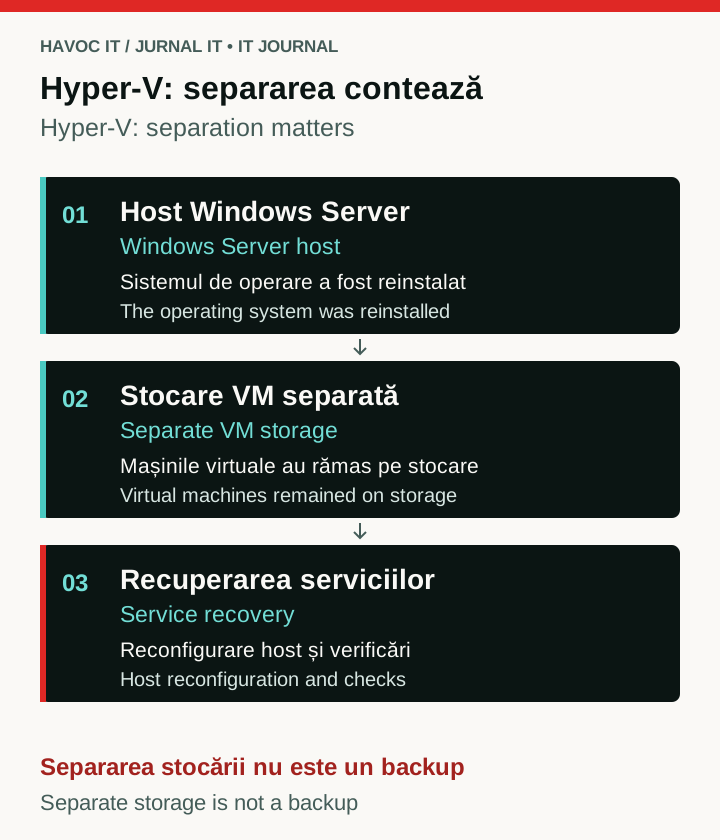 Open the full-size diagram (new tab)
Explanatory diagram of the recovery described: the host was reinstalled while the VMs remained on separate storage. Separate storage does not replace backup.
Initial checks
We started by checking the disks, identifying the offline Windows installation, and running SFC. The operating system was on E:, while the Hyper-V virtual machines were kept on D:.
SFC found corrupted files and repaired some of them, but after the restart nothing had changed. The server kept entering the same error.
We then moved on to DISM and checking the installed Windows packages. We tried reverting pending changes and removing updates that could have been related to the issue.
At one point, uninstalling an update reached 100%, but CBS refused to commit it with error 0x800f082f.
So we continued.
Several hours just for the WIM image
For the next stage, we needed a suitable component source for DISM. The installed system was build 10.0.20348.5386, and the Windows Server image we had was not at the same version.
This is probably where we lost most of the time.
It was not enough to mount the ISO and point DISM at an install.wim. We had to identify the right index, prepare the image, and bring it to the build we needed by applying the necessary updates.
Between mounting the image, injecting packages, committing, checking the result, and a few attempts that did not work the first time, roughly 3–4 hours went solely into preparing the WIM file.
Once we finally reached the required version, we ran DISM again using the new image as the source.
It did not solve the problem.
Errors related to CBS and components that Windows could not repair kept appearing.
Registry, system files and other attempts
Next, we checked the offline registry, the Windows hives, and the system files involved in error 0xC000021A.
We even reached the point of manually replacing some corrupted files with healthy versions and following several recovery procedures for cases where SFC and DISM can no longer repair the installation.
Some things appeared to be resolved along the way, but the result after restarting remained the same.
Windows would not boot.
After almost ten hours, we had reached the point where there were probably other things we could have tried, but we no longer had a clear indication that the next option had better chances than those before it.
So we decided to reinstall.
Reinstalling the Hyper-V host
The good part was that the VMs had not been affected. Their disks were still on D:, separate from the Windows Server installation.
We performed a clean installation of Windows Server 2022, reinstalled the Hyper-V role, restored the necessary configuration, and brought the virtual machines back.
We then checked the services one by one: the Domain Controllers, Active Directory and DNS, the RDS server with FSLogix, monitoring, and user access.
From the moment we started the reinstallation until the services were working again, about 90 minutes passed.
What we took from the incident
In terms of time, the difference was considerable: almost ten hours trying to recover the Windows installation, including roughly 3–4 hours just preparing the WIM image, and about an hour and a half to reinstall the host and bring the services back.
Looking back, we probably could have made the decision to reinstall earlier.
At the same time, there was no way to know at the start how deep the issue was. SFC had found corrupted files, there were signs related to updates and CBS, and DISM was a reasonable option to try before giving up on the existing installation.
The useful part of the incident was rather the confirmation of something quite ordinary: separating the operating system from VM storage made service recovery much simpler.
The host had to be reinstalled.
The virtual machines did not.
Published: