
HAVOC IT journal
SAGA + Power BI: when you don't need a new ERP to see your financial data clearly
A SAGA + Power BI pilot: read-only access, a controlled migration and reports still being validated.
Sometimes an IT project starts with a good question from someone who works with data every day. In this case, that question came from the new finance director at one of HAVOC IT's clients.
At previous companies, he had used ERP systems that let him bring financial data into Power BI and build reports that were much easier to follow than those available in the operational applications themselves. His new workplace was different: the accounts were kept in SAGA, and the company had no ERP with an established flow of data into Power BI for analysis.
The obvious first option would have been to implement an ERP. But that brings costs, migration, changes to internal processes, staff training and months of work. If the immediate problem is visibility into financial data, another question naturally follows: can we make better use of the system the company already has?
 Open the full-size diagram (new tab)
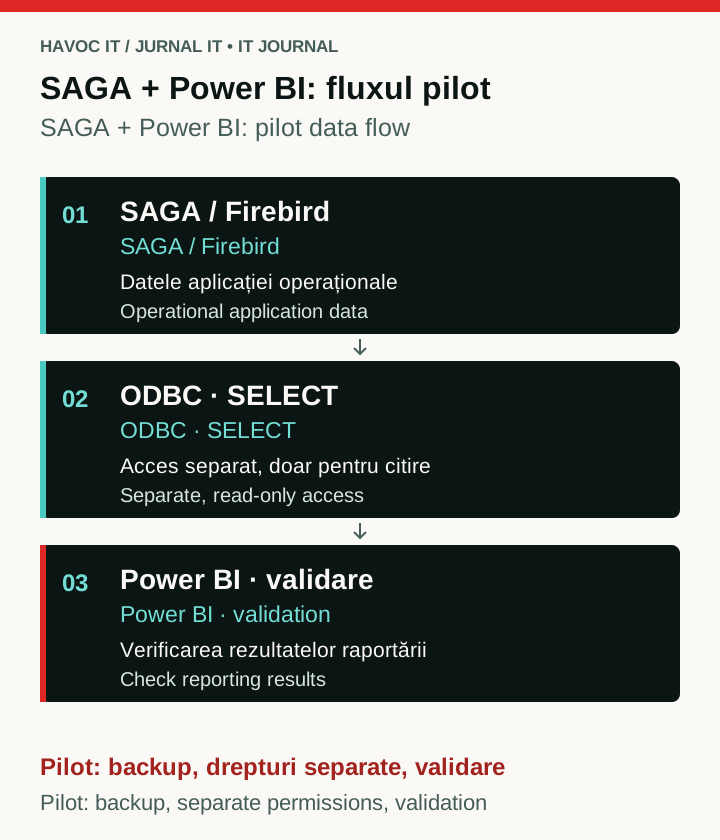
Conceptual pilot flow: controlled reading from Firebird and validation in Power BI. Backup, separate permissions and validation remain conditions before the solution can be considered stable.
The idea was not ours
Credit for the initial technical direction belongs to the finance director.
After looking into the problem, he identified Firebird as a possible way for Power BI to access SAGA data. We picked up the idea from there and began checking whether it could become a working solution without putting the accounting database at risk.
We want to be clear about that distinction. Working in IT does not mean you always have to be the person with the first idea. Sometimes the value lies in taking a good idea, checking whether it is sound and turning it into an implementation people can rely on.
In this case, the idea proved interesting enough for us to build a pilot project around it.
What we found behind SAGA
SAGA uses Firebird databases. That changes how we can approach the problem.
Power BI does not need to “read SAGA” in the usual sense. It needs to communicate safely with the Firebird database that holds the data required for reporting.
This is where a simple idea becomes an infrastructure challenge. We do not want Power BI to have administrative access to the database or to open .FDB files directly. A dashboard query must not accidentally change accounting data, let alone disrupt the people working in SAGA.
The pilot architecture was therefore built around separating those responsibilities.
Power BI connects to Firebird through ODBC. Reporting uses a separate database user with read-only permissions on the objects we need. The connection goes through the Firebird service, without copying or directly opening the database file.
That may sound like a technical detail, but it is one of the project's most important rules: reporting should consume data, rather than become another application that can change it.
From an old server to a platform we can build on
The project also arrived at a useful point in the client's infrastructure plans.
The existing SAGA and Firebird installation was running on Windows Server 2012, and we were already planning to move the application to new infrastructure. We used the opportunity to treat the migration and the Power BI integration as two separate tasks within the same project.
We are moving SAGA and the Firebird databases to the new server through a controlled process: backups, a trial restore, database checks and a rollback option. We introduce reporting only once the accounting system is stable.
That separation may seem excessive in a technical plan. It becomes much more important when you are working with a company's accounts. If a dashboard fails one morning, you fix it. If you have corrupted the accounting database while trying to build the dashboard, you have a very different problem.
Bringing Power BI into the picture
The pilot workstation has Power BI Desktop, the 64-bit Firebird ODBC driver and the Firebird client needed for the connection.
Power BI currently uses Import mode. Data is read through ODBC, with database access limited to the SELECT operations needed for reporting. We do not use the Firebird administrator account for Power BI, and we do not grant INSERT, UPDATE or DELETE permissions.
Then comes a question that IT cannot answer alone: what does the data in those tables actually mean?
Access to a database does not, by itself, give you a good financial report. You need to identify the right tables, the relationships between documents, the reporting periods, cancellations, corrections and the accounting rules used to calculate each measure. At that point, working with the finance director is just as important as the technical setup.
We can explain how the data reaches Power BI. He needs to confirm that what Power BI displays means, financially, what the company expects it to mean.
For now, it is a pilot project
We do not want to present this as a finished solution, because it is not one yet.
At the time of writing, we have a dedicated pilot machine, and the finance director is testing how the data can be used in Power BI and which reports can be built from it. Feedback so far has been very good, and the approach looks promising.
The most important part comes next: validation.
The measures calculated in Power BI need to be compared with the figures in SAGA. We need to monitor the effect of data refreshes on the server, decide which queries are worth keeping and see whether this approach remains simple and robust enough for everyday use.
If the results continue to support it, the company will get what it originally wanted: better financial visibility, without having to implement an ERP just to use Power BI.
Why we are writing about it
The finance director said something that prompted us to turn this work into an IT Journal article.
Before proposing the solution, he had searched online for information about integrating SAGA with Power BI and found few useful examples of how to do it in practice.
We cannot claim that nobody has done this integration before. That would be very difficult to prove, and it is not the interesting part of the story.
What is interesting is that many companies in Romania may be in a similar position. They use SAGA, have years of accounting data in the system, and their management teams would like to analyse that data in Power BI without replacing the company's entire software setup.
That is why we decided to document the project.
We are not presenting a universal recipe or a replacement for every ERP. An ERP solves far more problems than financial reporting, and there are companies for which implementing one is entirely justified.
But sometimes the useful question is “Can we get what we need by making better use of the data we already have?” before asking which new software to buy.
In this project, the answer so far appears to be yes.
We will return to the IT Journal after the pilot has passed validation, documenting what worked, what did not and how useful the integration between SAGA, Firebird and Power BI proved in practice.
Published: